


This blog is managed by the content creator and not GhanaWeb, its affiliates, or employees. Advertising on this blog requires a minimum of GH₵50 a week. Contact the blog owner with any queries.
Joseph Dumolga Blog of Thursday, 4 December 2025
Source: Elom Joseph Dumolga
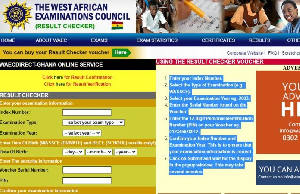

Waiting for your WASSCE results can be stressful. But checking them is easy! You can do it all on your phone. This guide shows you how to do it step by step.
Step 1: Buy Your Results Checker
First, you need to buy a results checker. This gives you a PIN and Serial Number that you need to see your results.
Here are two easy ways to buy it on your phone:
Use USSD Code: Dial *789*444# on your phone to buy a checker right away.
Buy Online: Go to
https://buycheckersnow.com on your phone. You can pay with Mobile Money or other ways. You get your PIN and Serial Number instantly.
Keep your PIN and Serial Number safe after you get them.
Step 2: Go to the WAEC Website
After you buy your checker, go to the WAEC results website.
Open your phone’s internet browser.
Type eresults.waecgh.org and press Enter.
The website works well on phones, so it’s easy to use.
Step 3: Fill in Your Information
The website will ask you for:
Index Number: Your 10-digit WASSCE number.
Exam Type: Choose “WASSCE”.
Year: Choose “2025”.
Date of Birth: Put your birthday as it was when you registered.
PIN and Serial Number: Put the PIN and Serial Number from your checker.
Step 4: Get Your Results
Before you submit, check that all your information is correct.
Click “Submit”.
Your results will show on your phone screen.
You can take a screenshot to save your results. You can also check your results again later with the same PIN and Serial Number.
WhatsApp or call 0502489506 for assistance.


