


Upon witnessing the impressive capabilities of Gemini for Android Auto, my anticipation, like that of many tech enthusiasts, soared. The prospect of integrating a sophisticated AI voice assistant directly into my vehicle’s infotainment system promised a significantly enhanced driving experience. However, after spending some time with the actual product, I must admit my initial excitement has been tempered by a notable degree of disappointment. The reality of Gemini on Android Auto, at least in its current iteration, falls short of the high expectations set by its pre-release demonstrations.
The Unbearable Weight of Expectation: A Road to Disappointment
Much of my current dissatisfaction stems directly from an exceptionally polished demo of the AI-powered voice assistant showcased on a car head unit at Mountain View during IO 2025. This presentation was, as I’d describe it, “almost on-rails.” While it meticulously highlighted Gemini’s intended functionalities on Android Auto through a series of scripted scenarios, the software remarkably demonstrated an ability to adapt to certain impromptu, “off-rails” requests. It bent and flexed with surprising grace, handling unexpected queries without a hitch, which left a profound impression on me and countless others.
Consequently, I left that demo brimming with enthusiasm, eager to experience this advanced AI in my own car. My vision was clear: Gemini would enrich my solo driving journeys, transforming mundane commutes into opportunities for intellectual engagement or practical problem-solving. On my mobile devices, Gemini Live has proven invaluable for delving into complex subjects or finding solutions to daily tech dilemmas – be it a software glitch or a PC malfunction. It effectively streamlines the troubleshooting process, often saving me the tedious task of sifting through countless Google search results to unearth a obscure forum post containing the precise information I need. While Gemini doesn’t always provide an immediate fix, it frequently offers alternative troubleshooting steps I hadn’t considered, helping me home in on solutions more efficiently.
Beyond practical applications, Gemini Live also serves as an excellent tool for spontaneous learning. Imagine hearing about a football (soccer) player on the radio and instantly wanting to learn more about their career trajectory. Gemini Live seamlessly transforms this casual interest into an engaging conversation or a dynamic Q&A session, far more stimulating than passively scrolling through endless Wikipedia articles. These might seem like rather mundane use-cases, but they are precisely the kind of interactions that elevate a potentially monotonous drive into something mentally stimulating, a welcome respite from staring at the bumper of the car ahead or enduring the same old radio chatter.
So, when I unexpectedly noticed an update on my device, and upon pressing the voice assistant button on my steering wheel, Gemini greeted me, I was genuinely thrilled. This joy, however, swiftly gave way to a mixture of frustration and mild disappointment. The implementation feels less like a revolutionary, wholly new in-vehicle experience that I witnessed last year, and more like Gemini has been somewhat awkwardly “hacked onto” the existing Google Assistant framework. My sentiment is not isolated. While some users are content, a significant portion shares my frustrations, evident in the extensive “megathread on Reddit” filled with various complaints detailing similar issues.
The More Things Change, The More They Stay the Same
For the past three to four years, the Google Assistant’s performance in vehicles has been largely stagnant, if not lackluster. With Gemini positioned as its direct replacement, there was a widespread expectation that its public rollout would usher in a far more robust and capable in-car AI. Regrettably, many of the lingering problems from the Assistant era persist, casting a shadow over Gemini’s debut.
Frustrations with Gemini Live’s Implementation
Gemini Live, undoubtedly, stands out as the saving grace of this integration. Its potential for deep, contextual conversations is truly transformative. However, its activation process leaves much to be desired. The wake phrase, “Let’s talk live,” is perfectly acceptable, but I frequently find myself defaulting to similar, yet incorrect, phrases such as “Let’s go live.” Given Gemini’s touted ability to understand context and nuance, it’s perplexing that such a minor deviation would consistently cause a hiccup. A more intuitive activation method would significantly improve the user experience. Ideally, this could be a simple on-screen toggle or a dedicated button. For vehicles already equipped with a voice assistant button, a long press or a sustained hold could be mapped to directly initiate Gemini Live, streamlining access and reducing cognitive load while driving.
It’s also crucial to remember that Gemini Live in-car is still technically in beta. While this status offers some leniency for imperfections, it doesn’t render it entirely “bulletproof.” Mirroring issues observed on its mobile counterpart, Gemini Live in the car also suffers from the “annoying accent or voice morphing” phenomenon that has been plaguing the assistant on phones. You might begin a conversation with one familiar voice, only for Gemini Live to activate with an entirely different one, complete with inconsistent cadence and response patterns that detract from the seamless interaction Google aims for. These inconsistencies, prevalent elsewhere, certainly need to be addressed in the automotive context.
Another significant drawback is the lack of cross-device chat synchronization. One of my foremost hopes for Gemini on Android Auto was the ability to seamlessly continue conversations initiated in the car on my phone, and vice-versa. The idea of getting out of my car, opening the Gemini app, and picking up exactly where I left off, or building upon a previous conversation, was incredibly appealing. As of this writing, nothing is being saved to my personal Gmail account. While I acknowledge this could potentially be a user-specific account issue, as I haven’t seen widespread complaints about it, it remains a frustrating omission for my personal workflow.
Furthermore, the overall pace of initiating a genuine back-and-forth conversation can be agonizingly slow. Depending on network connectivity, users are often greeted by a persistent, floating, flashing lilac bar – the usual indicator of the Assistant’s multi-colored response line – which can linger for an uncomfortably long time before any interaction begins. Not every query requires a “full” conversation, but this delay significantly mars the immediacy and fluidity that one expects from an AI assistant, especially in a dynamic driving environment. Despite these functional shortcomings, I do appreciate the visual design of the Gemini Live call UI; it integrates nicely where a music player would typically reside on the Android Auto homescreen, presenting a sensible and aesthetically pleasing interface.
The Shortcomings of “Ordinary” Gemini
While Gemini Live offers a glimpse of what’s possible, the “ordinary” Gemini experience is plagued with more fundamental frustrations. This basic functionality is theoretically useful for long drives or solo trips, but its effectiveness is severely hampered by perceived limitations. The “ordinary” Gemini appears to operate with restricted response windows while driving (or even parked). It’s unclear if this is a deliberate safety-related limitation, preventing extended conversational tangents, or simply a functional deficiency. If Android Auto intelligently detects that I am driving, it might be programmed to cut conversations or responses short, contrasting sharply with Gemini Live’s “always listening” mode.
Moreover, even in my electric vehicle, which typically boasts a much quieter cabin than its internal combustion engine counterparts, Gemini exhibits an overly sensitive response to ambient noises and interruptions. It frequently pauses mid-response or misinterprets regular car sounds as an interjection from me or a passenger, leading to frustrating conversational breaks. The degree to which this affects user experience will likely vary significantly based on the car’s interior acoustics.
As my colleague Ben Schoon recently highlighted, another daily annoyance with the new voice assistant is Gemini’s baffling inability to react to on-screen display reactions or taps. For instance, if you ask Gemini for directions to the nearest McDonald’s and it presents multiple options within a similar radius, tapping on one of those options on the screen yields no response. Instead, Gemini stubbornly waits for an audio cue or verbal confirmation, which not only slows down the process but also profoundly breaks the sense of immersion and intuitiveness. It feels undeniably “janky” and outdated in an era of touch-first interfaces.
Beyond these specific issues, the “regular” Gemini simply isn’t adept at listening for more than approximately 15 seconds at a stretch. It constantly cuts out, even when I have a robust 5G connection or when my phone/car is connected to Wi-Fi in my driveway. This frequent interruption is particularly irksome when attempting to reply to messages while driving. Gemini will read out a message when prompted, but during the dictation of my reply, it often abruptly stops listening, truncating my response. This lost context mid-sentence is incredibly annoying, forcing me to either re-record the entire message or send multiple fragmented messages, rather than maintaining a smooth conversational flow. My primary focus should always be on the road, and these interruptions significantly disrupt any cognitive “flow” I might have established.
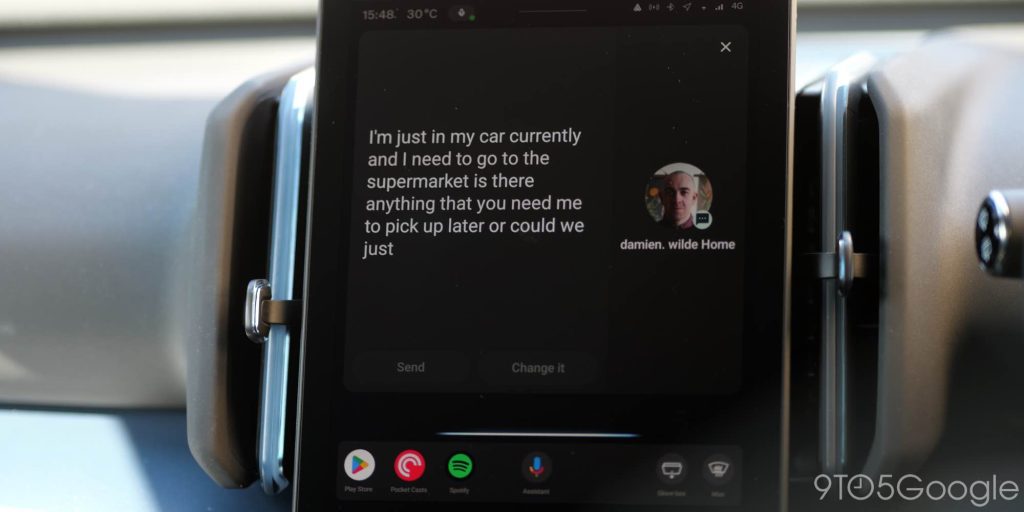
Beyond messaging, Gemini introduces unnecessary complexities compared to the previous Android Auto Assistant. It doesn’t consistently recognize saved locations in Google Maps, and it often provides overly verbose responses when a simple retort would suffice. Many common tasks now take longer because Gemini, rather than streamlining, effectively complicates the process, sometimes interjecting with unneeded “quips.” This isn’t just my observation; numerous online complaints echo these sentiments. While the Google Assistant certainly had its flaws, it was generally more concise and efficient when it did function correctly.
Unrealistic, Unmet Expectations: The Google Trait
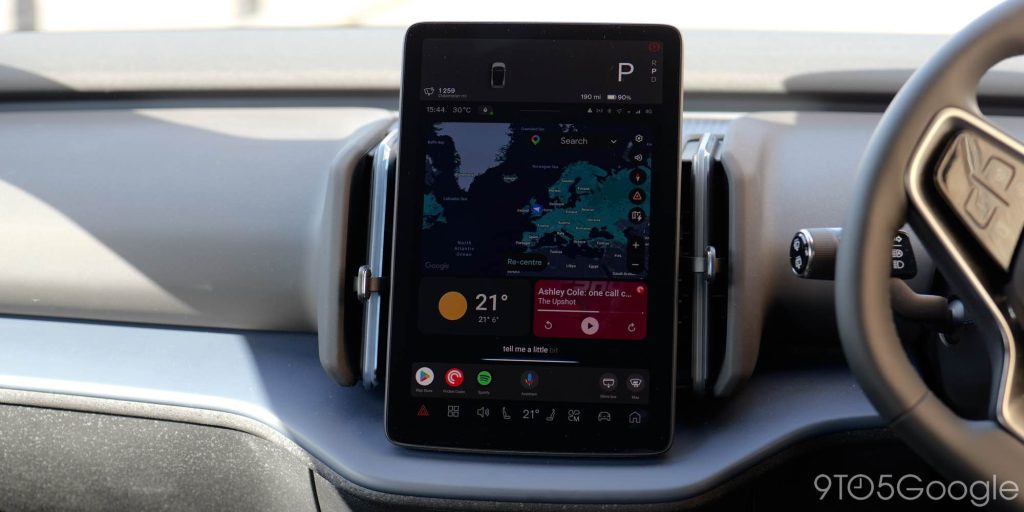
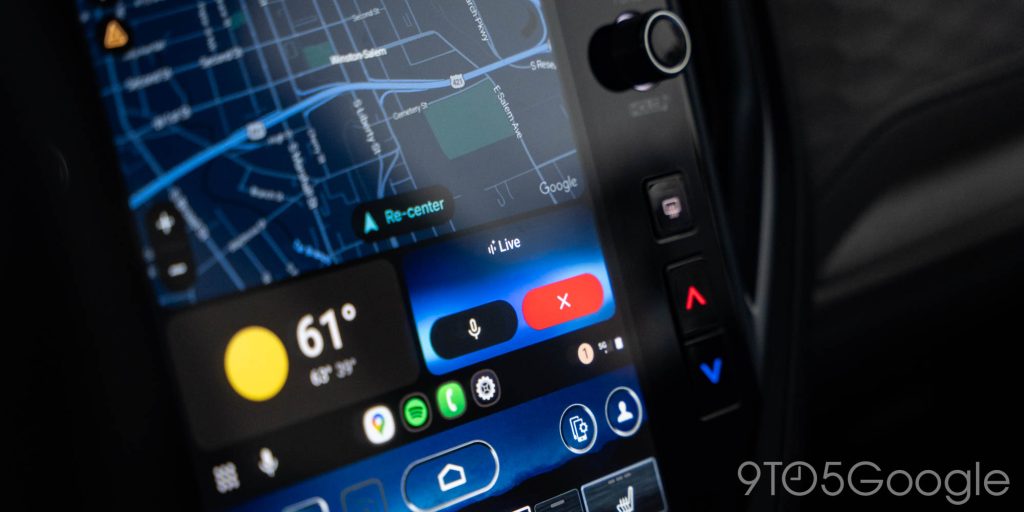
My primary disappointment stems from the significant divergence between the in-person demo of Gemini running on Android Auto at IO 2025 and the product that has been rolled out to the public. They are, quite simply, not the same. I understand that many users are frustrated by the transition from Google Assistant to Gemini, and while I empathize, I am not among them. In several respects, Gemini has offered a superior experience for me compared to its predecessor, particularly in its improved ability to handle imperfect requests – such as when I stutter or use an imprecise term for a smart home device.
However, that’s not the core of my critique. My fundamental issue is that Gemini on Android Auto, in its current state, feels like an inferior, “undercooked” version of what was initially presented. It’s not drastically incomplete, but it clearly requires further refinement to reach its full potential. This pattern of Google setting grand, almost unattainable expectations at events like IO, only to deliver a somewhat less polished product, is a recurring trait. It’s a tendency I had consciously tried to banish from my mind after personally witnessing Gemini’s impressive performance on both Android Automotive and Android Auto. The fact that Gemini for Android Auto was significantly delayed, yet still feels rushed and imperfect upon release, only compounds this sense of unmet expectation.
Conclusion
In summary, the journey with Gemini on Android Auto has been a mixed bag of soaring expectations and grounded realities. While the initial preview at IO 2025 painted a picture of a revolutionary in-car AI, the public release has, unfortunately, proven to be a less refined experience. Gemini Live stands out as the most promising feature, offering genuinely engaging and productive conversational capabilities that can transform mundane drives. However, its activation remains clunky, and the persistent voice morphing issues and lack of cross-device chat synchronization detract from its potential. The “ordinary” Gemini experience, in particular, is plagued by frustrating limitations: overly sensitive listening, the inability to interact with on-screen elements, short listening windows that interrupt dictation, and a tendency to add unnecessary steps to simple tasks. These shortcomings often make it less efficient than the Google Assistant it aims to replace, even with the Assistant’s own flaws. The core disappointment lies in the significant gap between the impressive demo and the current, somewhat rushed and undercooked product. While there’s certainly potential for improvement, Google must address these fundamental usability issues to truly deliver on the promise of Gemini as a seamless and intelligent driving companion. The weight of expectation, once a source of excitement, has now become a measure of how much better Gemini on Android Auto truly needs to be.
